
Frontier Internet Services, Pricing, and More
Frontier, a leading provider of high-speed internet, TV, and phone services, offers various plans to fit your needs and budget. Frontier provides two different forms of internet service: DSL and Frontier Fiber. Explore plans near you with HomeLinkd and learn more about Frontier internet below.
Why Choose Frontier Internet Services?
If you are on the hunt for a new provider, Frontier internet should be an option on your list and an option that is worth considering. Frontier’s motto is that fiber is the future. This provider makes good on the promise of innovation with ultra-fast fiber, good performance and reliability with 24/7 tech support, and finally transparency with no hidden fees and uncapped data. As you look into Frontier as a possible provider and make your decision, consider the following pros and cons:
Frontier offers affordable and reliable competitive prices on all plans, making it easy to find , high-speed internet plan that suits your budget.
While Frontier offers internet plans with reasonable prices, customers may frequently experience slow connection speeds or intermittent outages, making it difficult to accomplish everyday tasks such as completing work or streaming movies.
Frontier also offers packages that include multiple features such as TV, phone, and home security in addition to internet.
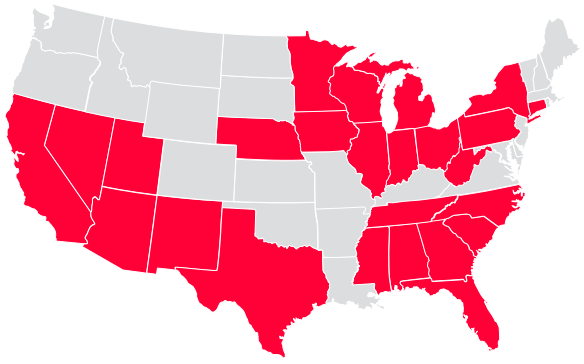
Another potential downside is Frontier’s lack of availability in many areas across the country, leaving customers with limited options for providers.
Frontier’s network is secure and consistently delivers fast download and upload speeds.
While Frontier’s advertised prices are affordable, there may be additional fees added to your bill, such as equipment rental fees or installation fees.
Frontier has local support teams available 24/7 so that you can get help with any issue you may encounter.
Frontier doesn’t require any long-term contracts, so you can cancel at any time without any fees or penalties.
Internet Services Offered by Frontier
Frontier offers everything you need to stay connected. From high-speed internet to reliable phone and television services, this provider has it all. And with Frontier internet, you can enjoy superior connection and streaming capabilities no matter where you live. Now that is service you can smile about!
Plan name
Speed
Ideal for
Price per month
What features are included
Spectrum Internet
Up to 300 Mbps
Downloading and streaming on multiple devices
$49.99
No data caps, 99.9% network reliability, ultra-low lag times for online gaming
Up to 500 Mbps
HD video streaming, uploading and downloading large files, connected smart home devices
$69.99
No data caps, ultra-fast speeds, seamless HD video streaming
Spectrum Internet Gig
Up to 1 Gbps
Multiple online gaming streams and VR, streaming in 4k and 8k, connected smart home devices
$89.99
No data caps, ultimate internet choice, no contracts or hidden fees
Frontier Fiber Plans
Plan
Price
Max Wired Speed
Included Router
Fiber 500
$49.99/mo
500/500 Mbps
Amazon eero 6+ router
Fiber 1 Gig
$69.99/mo
1000/1000 Mbps
Amazon eero 6 router
Fiber 2 Gig
$99.99/mo
2000/2000 Mbps
Amazon eero Pro 6E router
Fiber 5 Gig
$159.99/mo
5000/5000 Mbps
TP-link Archer AXE300 6E
*Offers and availability may vary by location and are subject to change without notice. Frontier® Internet service may not be available in all areas. Pricing, speeds, and promotional offers are subject to eligibility, service area, and may require a qualifying service plan. Additional fees, taxes, and terms may apply*
All plans include paperless billing and one-time charges apply. Wi-Fi speeds may vary depending on location and other factors.
Bundling Services
Frontier provides bundled packages that offer convenience, cost-effectiveness, customization, and additional perks to anyone seeking to have internet, TV, and phone services from one provider. If you’re looking for a provider that offers these benefits, Frontier could be an excellent choice for you. Here are your options
Package
Details
Internet + Unlimited Digital Voice
Taxes, govt. surcharges and one-time charges apply. Service subject to availability and all applicable terms and conditions. Speeds may not be available in all areas. No hidden monthly fees plus unlimited monthly data*. Stream your favorite movies & TV shows, or play games online. Unlimited nationwide calling
Internet + Unlimited Digital Voice + DISH America’s Top 120 Plus
$149.98/mo
For 12 mos. with 2-yr. agmt. on new DISH service. Taxes, govt. surcharges and one-time charges apply. Service subject to availability and all applicable terms and conditions. Speeds may not be available in all areas. Unlimited monthly data*. Stream your favorite movies and TV shows or play games online. Unlimited nationwide calling. 190+ Channels.
The benefits of bundling services with Frontier
- Bundling can simplify your life by having one provider for all of your home services, including internet, TV, and phone
- Bundling can give you more control over your services by allowing you to customize your bundle to fit your specific needs
- Bundling can provide better customer service, as you have one provider to contact for any issues or questions
- Bundling can often result in a lower overall monthly cost than purchasing each service separately from different providers
- Bundling can help you avoid the hassle of shopping around for different providers and services.
Search for a Provider by State
The browsing blues is a real thing. Browsing through provider after provider, only to find that they don’t offer service in your state can be overwhelming. Put the work in our hands. Try out HomeLinkd’s easy search tool. Simply enter your state and choose from a list of internet service providers who are available in your area. No more aimless searching or frustration – find the perfect internet provider for you with just a few clicks. Start your search now and give yourself the gift of a hassle-free internet experience.
Frequently asked questions
What is FrontierTV Everywhere?
You can watch about 100 live streaming channels or choose from an extensive On Demand TV library. FrontierTV Everywhere makes it possible to view available programs on a device other than a TV set such as a PC, laptop, iPad, iPhone or Android device. It is entertainment everywhere!
How is FrontierTV Everywhere different from offers such as Netflix or Hulu?
While there are several differences, the most important is that FrontierTV Everywhere is free to subscribers of FiOS from Frontier. The content available to you is based on the content package you have with Frontier (Premier, Prime, Essentials, Extreme, or Ultimate). Your content package will need to include the network you want to watch; however, not all channels in you package will offer TV everywhere video. Another difference is that FrontierTV Everywhere includes access to live and previously recorded shows. Hulu and Netflix only provide previously recorded shows. With FrontierTV everywhere you can view full episodes of current TV shows, usually within days of their premiere on network television.
How much does it FrontierTV cost?
Nothing. Nada. Zilch. You only need to be a subscriber to the TV network of the channel you wish to stream.
What happens if you can’t connect to your Frontier network?
Don’t panic. If you have a wireless device that can’t connect to the internet using your wireless network make sure:
The broadband home router is plugged directly into a working electrical wall outlet (not a power strip) and the power cord is connected securely on both ends.
The cable plugged into the back of the broadband home router is securely connected.
The wireless device that won’t connect has Wi-Fi enabled and is not in airplane mode.
The wireless device is logged in to your wireless network.
- The broadband home router is plugged directly into a working electrical wall outlet (not a power strip) and the power cord is connected securely on both ends.
- The cable plugged into the back of the broadband home router is securely connected.
- The wireless device that won’t connect has Wi-Fi enabled and is not in airplane mode.
- The wireless device is logged in to your wireless network.
Does Frontier’s internet work with all devices?
Yes, Frontier internet works with all types of devices including laptops, computers, smartphones, and tablets. All you need to connect to the internet is a wired connection or WiFi.
What are the average speeds for Frontier internet?
Frontier offers a variety of plans with different speeds, you have options. However, the average speeds range from 6 Mbps to 1,000 Mbps.
Is there a data cap for Frontier internet?
No. There is no data cap for Frontier internet, and you can use as much data as you want without any limits. The potential is unlimited too!
What is the Frontier refund policy?
If you cancel your Frontier service within 30 days of signing up, you will receive a full refund. If you cancel after 30 days, you will be charged a prorated amount for the remainder of your contract.
Can I get Frontier internet in my area?
Frontier offers service in many areas across the United States. To check if Frontier is available in your area, enter your zip code on HomeLinkd’s search tool.
What are the Frontier internet plans?
Frontier offers a variety of plans with different speeds and prices. Basic Internet plans start at $34.99/month and go up to $150 /month for Fiber Optic plans. It all depends on where you find yourself and what your needs are.
What is the Frontier Wi-Fi password?
If you are a new customer and you have not yet set your own password, your Frontier WiFi password is case sensitive and is located on the back of your modem. The password can also be found in your online account.
How do I change my Frontier Wi-Fi password?
To change your Frontier Wi-Fi password, login to your online account and click on the “Change Password” link. Enter your new password and click “Save”. You will then need to reconnect all of your devices to the Wi-Fi network using the new password.
How do I change my Frontier Wi-Fi password?
To change your Frontier Wi-Fi password, login to your online account and click on the “Change Password” link. Enter your new password and click “Save”. You will then need to reconnect all of your devices to the Wi-Fi network using the new password.